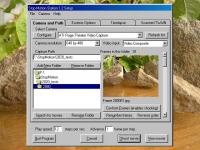
StopMotion Station turns a PC and an image source into a single frame movie camera and movie viewer. Shoot classic animation in all styles, shoot and view motion tests, and see any suitable series of images as a movie - instantly, at any speed.
StopMotion Station turns a PC and an image source into a single frame movie camera and versatile movie viewer. Shoot classic animation in all styles, shoot and view motion tests, invent new media and new styles, and see any suitable series of images as a movie - all instantly, at any speed.
You operate StopMotion Station using the keyboard. The Enter key is the camera's shutter release button and the Spacebar controls playback. The Up Arrow and Down Arrow keys set the movie's speed, from 1 to 30 frames per second. The monitor becomes either the camera's viewfinder or the movie screen.
StopMotion Station stores the frames you shoot as sequentially numbered JPEG files. It Plays the movie by showing the frames in sequence, forward or reverse, at the speed you set. You can Play any folder or a sequence of folders containing JPEG images as a movie, though it works best if all the images are the same pixel size and fit a VGA (640 x 480) screen. You can cut, copy, paste, and delete frames, and rearrange folders to edit your movie.
When StopMotion Station starts, it changes the display to VGA (640 x 480) and attempts to connect to an image source. It requires DirectX 8 or above for connecting to a camera and capturing frames.
You use the Setup dialog to choose a folder for Shooting or Viewing, to select and configure a camera, to set options for scaling and cropping the frames, or to set up Timelapse
shooting. Open the Setup dialog by right-clicking the mouse or pressing function key F2. Left-clicking the mouse opens a Mode/Play dialog that gives you some options via a conventional dialog, but everything you can do through the dialog - and much more - can be done directly from the keyboard.
Please read the Help file for a complete reference and description of what StopMotion Station does. You can view some Demo (Sample) movies by choosing "View demo movies"
on the Setup dialog's Main menu or pressing the F12 key in either Shoot or View modes. Whats new in version 1.2: Support WDM (DirectX) capture for 1394 cameras Requirements: Celeron 600, PIII 550 or faster. 24 bit VGA graphics. Operating system: Win98,WinME,WinXP Release notes: New Release
Automagical sketching with a reference photo; Easy drawing with your mouse or drawing tablet; Saving the drawing process to video or flash animation; One-click uploading to Facebook, Twitter and YouTube.
Price: $29.95, Rating: 5, Downloads: 97 Download
AlphaPlugins FirTree is a free plug-in filter for Adobe After Effects. This plug-in allows create animated fir tree branches. You can use these elements for decorating of your Merry Christmas and Happy New Year videos.
Price: $0, Rating: 10, Downloads: 83 Download
Designing your company logo yourself is easy. The Company Logo Designer makes it incredibly easy. You just have to click on what you like. No graphical talent needed.
Try it!
Price: $, Rating: 2.5, Downloads: 60 Download
User Rating
Rating:2.2 out of
5 Based on13 ratings.
13 user reviews.

 StopMotion Station 1.2 details